Compliance Automation
Compliance Automation: How It Works, Benefits & Examples

Samuel Mihalcik
Senior Consultant

Compliance Automation: What It Is, How It Works & What You Should Automate
Compliance automation is the use of software to reduce repetitive manual compliance work by automating activities such as task assignment, control reviews, evidence collection, monitoring, notifications and reporting. Instead of managing compliance through disconnected spreadsheets, emails and periodic checks, organizations can use automated workflows to maintain an up-to-date view of compliance activities and audit evidence.
At a glance
Manual compliance | Compliance automation |
|---|---|
Spreadsheets | Structured requirements and controls |
Email reminders | Automated notifications |
Manual evidence requests | Evidence workflows and integrations |
Periodic checks | Scheduled or continuous reviews |
Manual reporting | Automated dashboards and reports |
Disconnected findings | Assigned remediation workflows |
Teams that still run compliance this way usually aren't doing anything wrong, they've simply outgrown the tools they started with. A single ISO 27001 certification or SOC 2 report is manageable in a spreadsheet. Multiple frameworks, several business units, and a growing list of customer security questionnaires rarely are.
What Is Compliance Automation?
Compliance Automation Definition
At its core, compliance automation replaces manually tracked, ad hoc compliance work with structured, repeatable workflows. Requirements get mapped to specific controls. Controls get owners. Reviews happen on a schedule instead of whenever someone remembers. Evidence lands in one place rather than a scattered mix of inboxes and shared drives. None of this changes what compliance actually requires of an organization, it changes how consistently and how visibly that work gets done.
What Is Automated Compliance?
"Automated compliance" and "compliance automation" get used almost interchangeably, and in practice they describe the same shift: moving from people remembering to do things, to software prompting, tracking, and recording that they were done. A compliance automation platform doesn't decide whether your organization meets a regulation, a qualified person still makes that call. What the platform does is make sure the right evidence exists, the right person reviewed it, and the right record was kept.
Compliance Automation vs Manual Compliance
Manual compliance tends to fail quietly. A control owner leaves the company and nobody reassigns their tasks. A quarterly review slips to five months because there was no reminder. Evidence gets collected right before an audit instead of continuously, which means gaps only surface when it's already too late to fix them cheaply. Automated compliance workflows close these gaps by making the process itself visible, you can see what's overdue, who owns it, and what evidence is missing, in real time rather than at audit time.
Compliance Automation vs Continuous Compliance
These two terms overlap but aren't identical. Compliance automation is the broader category. It covers anything from automating a single reminder email to running a fully connected GRC platform. Continuous compliance automation is a specific, more advanced version of it: instead of reviewing controls on a fixed schedule (say, quarterly), the system checks control status on an ongoing basis, often pulling signals directly from the tools being monitored. We'll come back to this distinction later, because it matters a lot for how mature your compliance program needs to be before it's worth pursuing.
How Does Compliance Automation Work?
Most compliance automation platforms follow a similar underlying logic, even if the interface looks different from vendor to vendor. Here's the sequence, step by step.
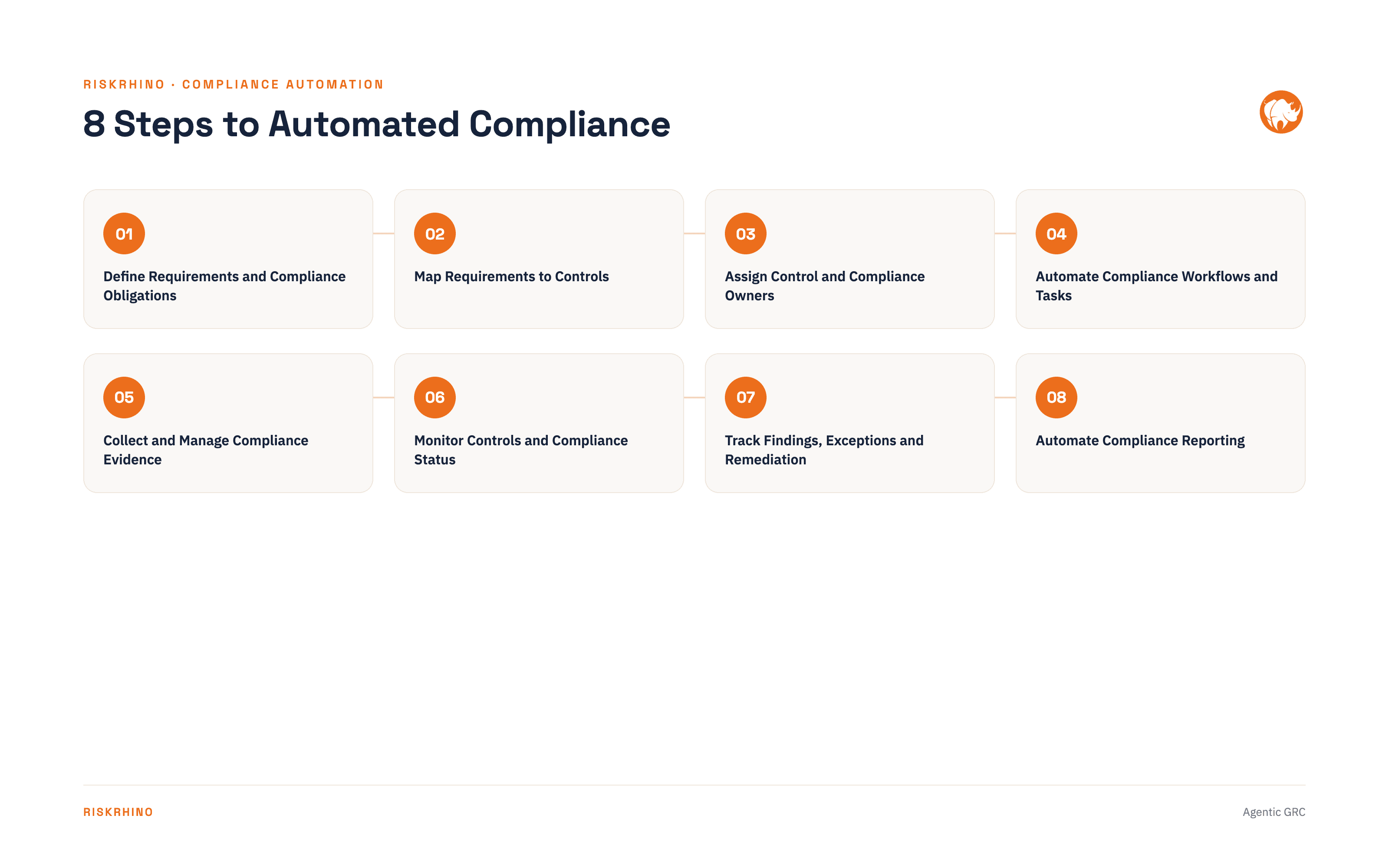
1. Define Requirements and Compliance Obligations
Everything starts with a clear list of what you're actually required to do, clauses from ISO 27001, articles from GDPR, criteria from SOC 2, sections of HIPAA, or contractual obligations from a customer. Automation can't help until this list exists in a structured form rather than scattered across PDFs and old emails.
2. Map Requirements to Controls
Each requirement gets linked to one or more internal controls, the actual policies, technical configurations, or processes that satisfy it. This mapping is what lets a single control (say, "access reviews are performed quarterly") count toward multiple frameworks at once, which is one of the biggest time savers once organizations juggle more than one regulation.
3. Assign Control and Compliance Owners
Every control needs a named owner, not a department. "IT is responsible for this" is where accountability tends to quietly disappear. Automation platforms enforce individual ownership and track who's responsible for what, which turns out to matter enormously the first time an auditor asks "who approved this."
4. Automate Compliance Workflows and Tasks
This is where compliance workflow automation actually kicks in. Tasks get generated automatically based on the schedule a control requires, a review due every 90 days, a policy attestation due annually, an access recertification due every quarter. Nobody has to remember to create the task; the system creates it and assigns it.
5. Collect and Manage Compliance Evidence
Rather than chasing screenshots and exports by email, evidence gets collected through structured requests, integrations with the tools being audited, or scheduled uploads. Over time this evidence accumulates automatically, so by the time an audit rolls around, most of what's needed already exists.
6. Monitor Controls and Compliance Status
Dashboards show which controls are healthy, which are overdue, and which have failed. Some platforms pull live signals from connected systems (cloud infrastructure, identity providers, HR systems) so a control's status reflects reality rather than the last time someone remembered to check.
7. Track Findings, Exceptions and Remediation
When something fails a review, it shouldn't just sit in a comment or a Slack message. Findings get logged, assigned an owner, given a remediation deadline, and tracked until closed, creating a record that shows the issue was identified and handled, which is exactly what auditors look for.
8. Automate Compliance Reporting
Finally, all of this activity rolls up into reporting, for auditors, for leadership, for the board. Automated compliance reporting means these reports generate from live data rather than being rebuilt manually in a spreadsheet every time someone asks for a status update.
Before → After: the same work, restructured
Before (manual) | After (automated) | Why it's better |
|---|---|---|
Regulation | Requirement | Directly mapped to a control, not just read and interpreted by a person |
Spreadsheet | Control | Living, testable control instead of a static row in a file |
Email control owner | Owner | Owner is assigned in-system, not chased down each cycle |
Wait / chase | Automated review / task | Runs on schedule, no waiting on a human to start it |
Collect evidence | Evidence | Captured automatically at the source, not manually gathered |
Update spreadsheet | Finding / result | Result is generated by the check itself, not typed in after the fact |
Find gaps | Remediation | Gap triggers a remediation task immediately, instead of being "found" later |
Email remediation owner | Audit trail | Every action is logged automatically, nothing depends on an email existing |
Prepare report | Dashboard / report | Always current and live, instead of a snapshot someone has to assemble |
Manual compliance spends most of its energy chasing people and rebuilding status from scratch. Automated compliance spends that same energy up front, on structuring the work once, so the ongoing cost of staying compliant drops sharply.
See an automated compliance workflow
See how requirements, controls, owners, reviews, evidence and findings can be connected in one workflow.
What Compliance Processes Can Be Automated?
Not every part of compliance can or should be automated (more on that shortly), but a surprising amount of the day-to-day workload can be. Here's where compliance workflow automation tends to deliver the most value.
Compliance Workflow Automation
This is the umbrella category: turning ad hoc compliance tasks: reviews, sign-offs, approvals, escalations into structured, scheduled workflows with defined owners and deadlines. It's usually the first thing organizations automate, because it's the most visible source of dropped balls.
Automated Evidence Collection
Instead of emailing "can you send me the latest access review?" every quarter, evidence collection can be scheduled, requested automatically, or pulled directly from integrated systems. This is one of the areas where automated compliance tools pay for themselves fastest, since evidence chasing is usually the single most time-consuming part of audit prep.
Automated Control Assessments and Testing
Control testing, checking whether a control is actually operating as designed, can be scheduled and, for technical controls, partly automated through direct system checks rather than manual sampling.
Automated Compliance Reporting
Status reports, control summaries, and audit-readiness dashboards can be generated on demand instead of assembled manually each time someone needs an update.
Regulatory Reporting Automation
For organizations with formal reporting obligations to regulators:
financial services firms filing with supervisory authorities
healthcare organizations reporting under HIPAA
or companies handling breach notifications under GDPR.
Regulatory reporting automation reduces the risk of missed deadlines and formatting errors that come from assembling these reports by hand each cycle.
Policy Reviews and Attestations
Policies need periodic review and, often, formal attestation from employees. Automating the review cycle and the attestation tracking (who signed, when, which version) removes one of the more tedious recurring tasks in any compliance program.
Risk Assessments and Compliance Reviews
Recurring risk assessment, or tied to specific triggers like a new vendor or a system change, can be templated and scheduled rather than started from a blank document each time.
Security Questionnaire Automation
For B2B companies, security questionnaire automation is often where the pain is most acute. Sales and security teams end up answering the same 150 questions, worded slightly differently, over and over. Automate security questionnaire response through a maintained answer library, and most of a questionnaire can be pre-filled from previous, approved answers, turning what used to take days into a task measured in hours. Security questionnaire response automation of this kind is one of the fastest ROI wins in the whole category, which is reflected in how much commercial search interest it draws on its own.
Issue, Finding and Remediation Tracking
Findings from audits, assessments, or automated monitoring need a home other than someone's inbox. Automated tracking assigns an owner, a deadline, and a status, and keeps a record of how the issue was resolved.
Notifications, Deadlines and Escalations
Underneath almost every process above is the same simple mechanism: automated reminders and escalations. A review due in five days triggers a notification. If it's still overdue in ten, it escalates to a manager. This sounds unglamorous, but it's often the single biggest driver of whether a compliance program actually stays on schedule.
What would this look like in practice?
RiskRhino lets you connect compliance requirements with controls, owners, reviews, evidence, findings and reporting, so repetitive compliance work becomes a managed workflow instead of a collection of spreadsheets and emails.
Compliance Automation Examples
Abstract descriptions only go so far. Here's what compliance automation actually looks like in five common scenarios.
Example 1: Automating a Control Review
A quarterly access review used to mean a compliance manager emailing each department head, waiting a week, chasing the two who didn't respond, then manually compiling the results into a spreadsheet. With an automated workflow, the review is generated on schedule, routed to the correct owner automatically, and the completed review, along with any exceptions, is logged with a timestamp, no chasing required.
Example 2: Automating Evidence Collection
A SOC 2 auditor requests evidence for 40 controls. Under a manual process, someone spends a week pulling screenshots, exporting logs, and emailing system owners for anything missing. Under an automated process, much of that evidence has already been collected continuously throughout the year through scheduled requests or system integrations, so the audit prep window shrinks from weeks to days.
Example 3: Automating Regulatory Compliance Reporting
A financial services firm needs to produce a quarterly compliance report for its board and, in some cases, a regulator. Manually, this means someone reconstructing the quarter's activity from several disconnected sources. With automated regulatory compliance reporting, the report pulls directly from the same system that tracked the controls, reviews, and findings all quarter, so the numbers are already correct by the time the report is requested.
Example 4: Automating a Security Questionnaire
A prospective enterprise customer sends over a 200-question security questionnaire as part of procurement. Historically, this lands on someone's desk and takes three or four days to complete, much of it re-answering questions the team has answered a dozen times before. With security questionnaire automation and a maintained answer library, most of the questionnaire auto-populates from prior approved responses, and the remaining time goes toward reviewing the small number of genuinely new questions.
Example 5: Automating Audit Preparation
Rather than a frantic six-week scramble before an annual audit, automated audit preparation means evidence, control status, and findings have been accumulating all year. The "audit prep" period becomes a review and cleanup pass instead of a from-scratch evidence hunt.
Manual Compliance vs Automated Compliance
Spreadsheet-Based Compliance Workflow
In a spreadsheet-based workflow, each control lives as a row. Status gets updated by hand, usually right before someone needs to report on it rather than continuously. Ownership is often a department name rather than a person. Evidence lives in a separate folder structure that may or may not match what the spreadsheet claims. It works, until it doesn't, usually right around the time a second framework or a second business unit gets added.
Automated Compliance Workflow
In an automated workflow, the same information exists, but it's connected rather than duplicated. A control's status updates when a review is completed, not when someone remembers to update a cell. Evidence attaches directly to the control it supports. Ownership is a named individual who receives a task, not a department that receives an email nobody actioned.
Before and After Example
Picture a mid-sized SaaS company preparing for its second SOC 2 audit. In year one, using spreadsheets, the compliance lead spent roughly six weeks gathering evidence and chasing 14 different control owners, several of whom had never seen the spreadsheet before. In year two, after adopting compliance workflow automation, the same evidence had been accumulating throughout the year through scheduled tasks and integrations. Audit prep dropped to under two weeks, not because the underlying compliance requirements got easier, but because the process of proving them did.
What Is GRC Automation?
How GRC Automation Relates to Compliance Automation
GRC stands for governance, risk, and compliance, three disciplines that are closely related but not identical. Compliance automation, as we've covered so far, focuses specifically on meeting external requirements: regulations, standards, contractual obligations. GRC automation is broader. It also covers governance (how decisions get made and documented) and risk management (identifying, assessing, and treating risk, independent of any specific compliance requirement). In practice, most organizations that start with compliance automation eventually grow into needing GRC automation, because compliance, risk, and governance data all reference the same underlying controls and owners.
What GRC Processes Can Be Automated?
Beyond the compliance workflows already described, GRC automation tools typically also cover: risk register management and scoring, vendor and third-party risk assessments, policy governance and version control, incident and issue management, and board or leadership-level risk reporting. A mature GRC automation platform connects all of these to the same control library used for compliance, so a single control review can simultaneously satisfy a risk treatment plan and a SOC 2 requirement.
Compliance Automation vs GRC Automation
The simplest way to think about it: compliance automation is a subset of GRC automation. If your only goal is passing audits against a defined set of frameworks, compliance automation tools may be all you need. If you also need to manage a risk register, track vendor risk, or produce governance reporting for a board, you're looking at GRC automation. Evaluating GRC automation vs compliance automation platforms usually comes down to whether risk and governance, not just compliance, need to live in the same system.
What Is Continuous Compliance Automation?
Periodic Compliance vs Continuous Compliance
Traditional compliance programs check control status periodically or right before an audit. Continuous compliance automation flips this: controls are checked constantly, or as close to constantly as the underlying system allows, so status reflects the present moment rather than the last scheduled review.
Continuous Control Monitoring
Continuous control monitoring works by connecting directly to the systems a control depends on. It can be cloud infrastructure, identity and access management, endpoint security tools, and checking their configuration against what the control requires. Some teams refer to this ongoing checking as compliance surveillance, though the term can sound more intense than the reality.
When Continuous Compliance Makes Sense
Continuous compliance tools aren't necessary for every organization. A small company with one framework and a stable environment may do fine with well-run periodic reviews. Continuous monitoring earns its cost when the environment changes frequently, fast-growing engineering teams, cloud infrastructure that shifts weekly, or multiple frameworks with overlapping but not identical review cycles. In those situations, a quarterly snapshot is stale almost as soon as it's taken.
Benefits of Compliance Automation
Reduce Manual Compliance Work
The most immediate benefit is simply time back. Tasks that used to require manually chasing people, rebuilding spreadsheets, and reconstructing history from email threads happen through structured workflows instead.
Improve Audit Readiness
Because evidence accumulates continuously rather than being gathered in a last-minute scramble, audits become a review of existing records rather than a research project.
Create Consistent and Repeatable Processes
A control reviewed the same way every quarter, by the same defined process, produces more reliable results than one reviewed slightly differently depending on who happened to run it that quarter.
Improve Accountability and Ownership
Named owners with tracked tasks create a clear record of who was responsible for what, useful both for internal accountability and for demonstrating due diligence to an auditor or regulator.
Maintain a Complete Audit Trail
Every review, every piece of evidence, every finding and its remediation gets timestamped and logged automatically, producing an audit trail that would be extremely labor-intensive to reconstruct by hand after the fact.
Improve Compliance Visibility and Reporting
Leadership can see compliance status at any moment rather than requesting a report and waiting for someone to compile it. It is a shift that also tends to surface problems earlier, while they're still cheap to fix.
Scale Across Multiple Regulations and Frameworks
Because a single control can map to multiple requirements, adding a second or third framework doesn't multiply the workload the way it would in a spreadsheet-based process, where each framework often gets tracked separately from scratch.
What Should You Not Automate?
It's worth being honest about the limits here, because overselling automation is how compliance programs end up with a false sense of security.
Regulatory Interpretation
Deciding what a regulation actually requires, especially in ambiguous or novel situations, is a judgment call for qualified people, typically legal or compliance experts. Software can help track and structure that interpretation once it's made. It shouldn't be the one making it.
Risk Acceptance and Business Decisions
Whether a given risk is acceptable to the business is a leadership decision, weighing cost, likelihood, and impact against business priorities. Automation can present the data needed to make that decision, but it can't make the decision.
Complex Exceptions and Judgment Calls
Most controls have edge cases that don't fit the standard workflow, a legitimate but unusual access request, a control that technically fails but poses no real risk in context. These need a human to look at the specifics rather than a rule that treats every exception the same way.
Final Accountability and Approval
Somewhere in the process, a person needs to sign off. Automation can prepare everything that person needs to make an informed decision quickly, but the accountability for that decision stays with them, not the software.
How AI Is Changing Compliance Automation
AI-Assisted Control and Requirement Mapping
Mapping a new regulation's requirements to existing controls used to be slow, manual work. Reading through clause after clause and matching it to what already exists. AI can now suggest these mappings as a starting point, which a compliance professional then reviews and confirms, cutting the initial mapping time substantially.
AI for Compliance Evidence Analysis
Rather than a human reading through every log export or configuration screenshot, AI can flag anomalies or gaps in submitted evidence for a reviewer to focus on, narrowing manual review to the cases that actually need it.
AI-Assisted Risk and Gap Analysis
AI tools can compare current control coverage against a target framework and highlight where gaps likely exist, giving compliance teams a starting point rather than a blank page when scoping a new certification.
AI for Compliance Reporting and Summaries
Turning raw control and finding data into a readable narrative report used to take hours of manual writing. AI can now draft a first version of that summary, which someone then edits and approves, speeding up reporting without removing the human review step.
AI Agents for GRC and Compliance Workflows
The newest layer is AI agents that don't just suggest actions but can carry out defined, low-risk steps within a GRC automation workflow, drafting a first-pass response to a routine security questionnaire question, for instance, or pulling together evidence for a scheduled review. This is still an emerging area, and the agents that matter are the ones with clear guardrails, not the ones acting with unrestricted autonomy.
Where Human Review Is Still Required
For anything that touches regulatory interpretation, risk acceptance, or final sign-off. AI should be treated as a drafting and research assistant, not a decision-maker. The organizations getting the most value from ai grc automation right now are the ones using it to speed up preparation, not to remove human judgment from the loop.
How to Start Automating Compliance
If you're just starting with GRC automation, or moving beyond spreadsheets for the first time, it helps to have a sequence rather than trying to automate everything simultaneously.
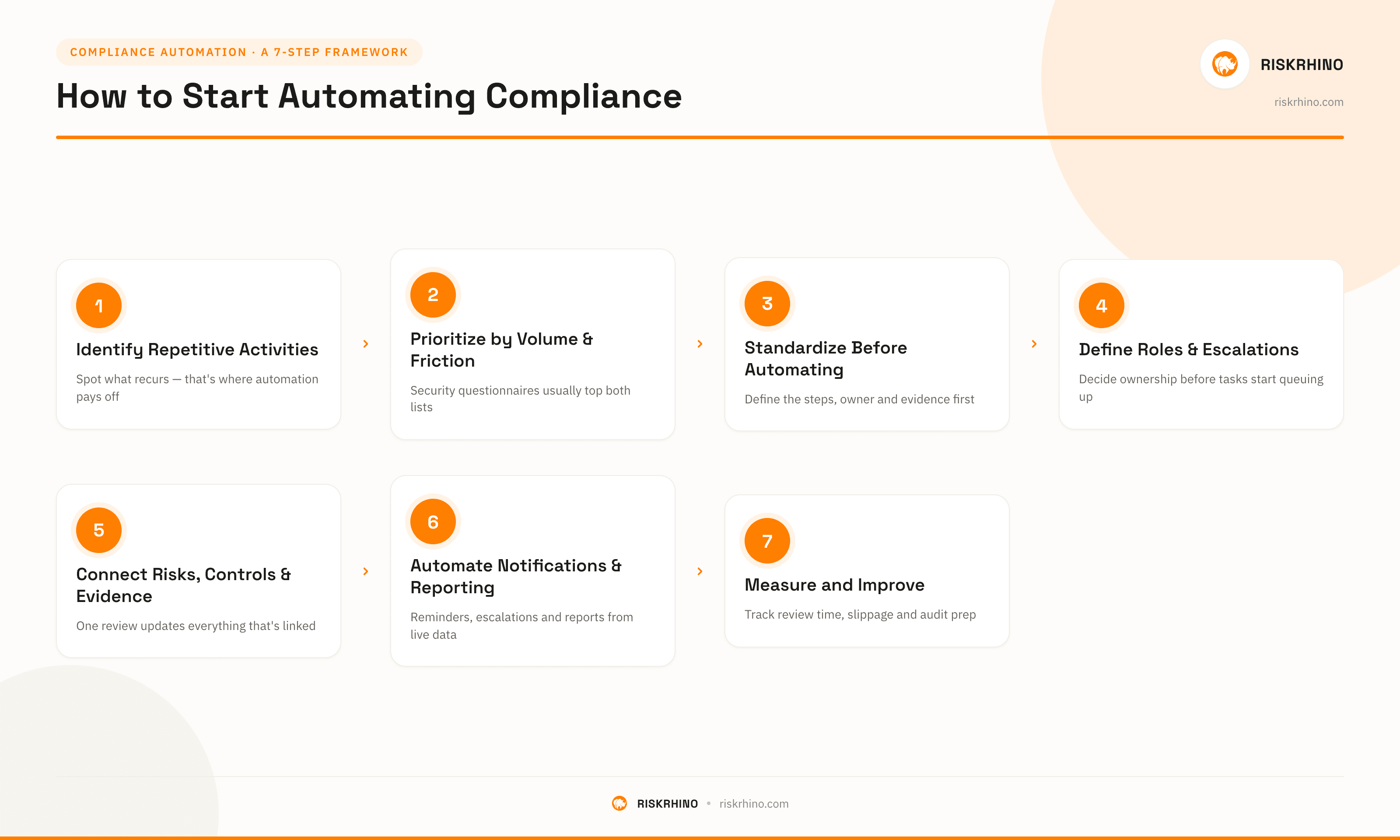
Step 1: Identify Repetitive Compliance Activities
Look at what recurs. Quarterly reviews, annual attestations, recurring evidence requests and create a list. These recurring tasks are almost always where automation pays off fastest.
Step 2: Prioritize High-Volume and High-Friction Processes
Not everything on that list deserves equal priority. Rank by volume (how often it happens) and friction (how painful it currently is). Security questionnaire response, for most B2B companies, tends to land near the top of both lists.
Step 3: Standardize the Workflow Before Automating It
Automating a messy, inconsistent process just makes the mess happen faster. Define the steps, the owner, and the expected evidence for a process before building automation around it.
Step 4: Define Roles, Responsibilities and Escalations
Decide who owns each control, who reviews exceptions, and what happens when something is overdue, before the system starts generating tasks, otherwise the first automated task just lands in a queue nobody's watching.
Step 5: Connect Risks, Controls, Requirements and Evidence
This is where the pieces start reinforcing each other. Once a control is linked to the risk it mitigates, the requirement it satisfies, and the evidence that proves it, a single review updates all three at once.
Step 6: Automate Notifications, Reviews and Reporting
With the structure in place, layer on the automation itself: scheduled reviews, automatic reminders, escalations for overdue items, and reports that pull from live data.
Step 7: Measure and Improve the Process
Track how long reviews take, how often deadlines slip, and how long audit prep takes compared to before. These numbers make the case for further investment and reveal which workflows still need adjusting.
What to Look for in Compliance Automation Software
Whether you're evaluating automated compliance tools for the first time or replacing something that's outgrown your needs, a few capabilities matter more than the marketing copy around them.
Workflow Automation - Can the platform generate tasks on a schedule, route them to the right owner, and escalate when they're overdue, without someone manually kicking off each cycle?
Control and Requirement Mapping - Does it let a single control satisfy multiple frameworks, or does each new regulation mean rebuilding your control library from scratch?
Evidence Management - Can evidence be collected on a schedule, pulled from integrations, or requested automatically and does it stay linked to the control it supports?
Continuous Monitoring - If your environment changes frequently, does the platform offer continuous control monitoring?
Automated Reporting - Can you generate a current, accurate compliance report on demand?
Audit Trails - Is every review, approval, and change logged automatically with a timestamp, the kind of record an auditor will actually ask to see?
Roles, Responsibilities and Approvals - Does the platform support named individual ownership, defined approval chains, and clear accountability?
Integrations - Can it connect to the cloud infrastructure, identity provider, HR system, and other tools that generate compliance-relevant evidence automatically?
AI Capabilities - Does it use AI to speed up mapping, evidence review, and reporting in ways that still keep a human in the approval loop?
Multi-Framework and Multi-Entity Support - If you operate across multiple regulations, business units, or legal entities, can the platform handle that without duplicating your entire control library for each one?
If you've already been comparing platforms, these are the questions worth applying to each of them, rather than picking based on brand recognition alone. There isn't a single "best GRC automation platform" that fits every organization. There's the platform that fits your framework mix, team size, and integration needs.
See how your compliance workflow could be automated
Explore how RiskRhino can automate reviews, assignments, evidence, findings and reporting while keeping risks, controls and regulatory requirements connected.
Compliance Automation vs Compliance Management Software
When Simple Automation Is Enough
If your needs are narrow, one framework, a small team, straightforward requirements a lighter compliance automation tool focused on workflows and evidence may cover everything you need without the overhead of a full platform.
When You Need a GRC Platform
Once risk management, vendor assessments, multiple frameworks, or board-level governance reporting enter the picture, a dedicated GRC automation platform generally serves you better than a narrower compliance point solution, because it keeps risk, governance, and compliance data connected rather than siloed.
When You Need Both
Many organizations land here without planning to: they adopt a lightweight compliance tool early on, then outgrow it as risk and governance needs expand, eventually consolidating onto a broader risk and compliance management software platform. Knowing this pattern in advance can save you a migration a year or two down the line.
From Compliance Automation to Integrated GRC
Connect Compliance Requirements to Risks
Every compliance requirement exists, ultimately, because it addresses some risk. Making that link explicit means a compliance gap automatically surfaces as a risk that needs treatment, rather than living in a separate silo.
Connect Risks to Controls
Once risks and controls are linked, you can see not just "is this control passing," but "what risk gets worse if it fails" a much more useful question when prioritizing what to fix first.
Connect Controls to Evidence and Reviews
This is the foundation covered earlier in this article, and it's what makes everything above it trustworthy: a control's status is only as good as the evidence and review behind it.
Connect Findings to Remediation
A finding that isn't tied to a tracked remediation plan tends to get rediscovered, unresolved, at the next audit. Connecting findings directly to owners and deadlines closes that loop.
Turn Compliance Data Into Management Reporting
With everything connected: requirements, risks, controls, evidence, findings, GRC reporting and analytics automation tools can generate leadership and board reporting directly from live data, rather than someone assembling a slide deck from five different sources the week before a meeting.
Frequently Asked Questions About Compliance Automation
What is compliance automation?
Compliance automation is the use of software to automate repetitive compliance tasks, such as control reviews, evidence collection, monitoring, and reporting that would otherwise be tracked manually through spreadsheets and email.
What compliance tasks can be automated?
Common examples include compliance workflow automation, evidence collection, control testing, policy attestations, risk assessments, security questionnaire automation, finding and remediation tracking, and automated compliance reporting.
What is GRC automation?
GRC automation extends compliance automation to also cover governance and risk management, including risk registers, vendor risk assessments, and governance reporting therefore connecting them to the same controls used for compliance.
What is continuous compliance automation?
Continuous compliance automation checks control status on an ongoing basis, often through direct integrations with the systems being monitored, rather than relying on scheduled periodic reviews.
Can compliance be fully automated?
No. Automation handles the repetitive, structured parts of compliance well like workflows, evidence, reporting, but regulatory interpretation, risk acceptance, and final approval still require human judgment and accountability.
Can AI automate compliance?
AI can assist with control mapping, evidence review, gap analysis, and drafting reports, which speeds up compliance work significantly. It works best as a drafting and research tool alongside human review, not as a replacement for it.
What is compliance workflow automation?
Compliance workflow automation turns recurring compliance tasks, reviews, approvals, attestations, into scheduled, assigned workflows with defined owners and deadlines.
What is automated compliance reporting?
Automated compliance reporting generates status reports and dashboards directly from live compliance data, rather than requiring someone to manually compile a report from separate sources each time one is needed.
What is the difference between compliance automation and GRC?
Compliance automation focuses specifically on meeting defined external requirements. GRC automation is broader, also covering risk management and governance, and is generally the better fit once an organization needs to manage risk and governance data alongside compliance.
How do you automate compliance evidence collection?
Evidence collection can be automated through scheduled requests, integrations with the systems that generate evidence (cloud infrastructure, identity providers, HR systems), or recurring upload workflows tied to specific controls.
What are the benefits of compliance automation?
Key benefits include less manual work, better audit readiness, more consistent processes, clearer accountability, a complete audit trail, improved visibility for leadership, and the ability to scale across multiple regulations without multiplying effort.
How do I start automating compliance?
Start by identifying your most repetitive compliance activities, prioritize the highest-volume and highest-friction ones. Then standardize the workflow before automating it and define clear ownership. Lastly, layer on automated notifications, reviews, and reporting, measuring the impact as you go.